
A printed QR code has no fixed expiration date. QR codes for printed materials remain useful as long as the pattern can be scanned and its destination is active. If either fails, the code may lead nowhere, even while the paper or sign remains in place.
That distinction matters when a brochure, menu, yard sign, or event banner stays in circulation long after printing. The code may still be intact, but a moved page, expired domain, faded print, or low contrast can break the path it was meant to create.
This guide explains how print quality and material affect scanability, why contrast matters, and how an editable destination can extend a printed code’s usefulness. It also covers how scan analytics can help you assess whether your materials are working. The practical measure is not just how long a code lasts. It is whether people can scan it, reach a live destination, and provide useful signals through their visits.
Key Takeaways
- A printed code has no set expiration date; its usefulness depends on both physical readability and an active destination.
- Choose print materials with the placement in mind, since handling, weather, and glare can affect whether a code remains scannable.
- Check contrast and scanability before production so a polished design does not become a barrier for phone cameras.
- Use an editable destination when the printed piece may outlast its original page, campaign, or event details.
- Review scan activity to understand when and where printed pieces are working, then use that insight to guide future placements.
1. Choosing QR-code printing materials for the use environment
A printed QR code has no fixed expiration date. It remains useful while the pattern is readable and its destination is active. When planning QR codes for printed materials, consider both the surface and its surroundings. A menu on a table faces different wear from a sign at a garage entrance.
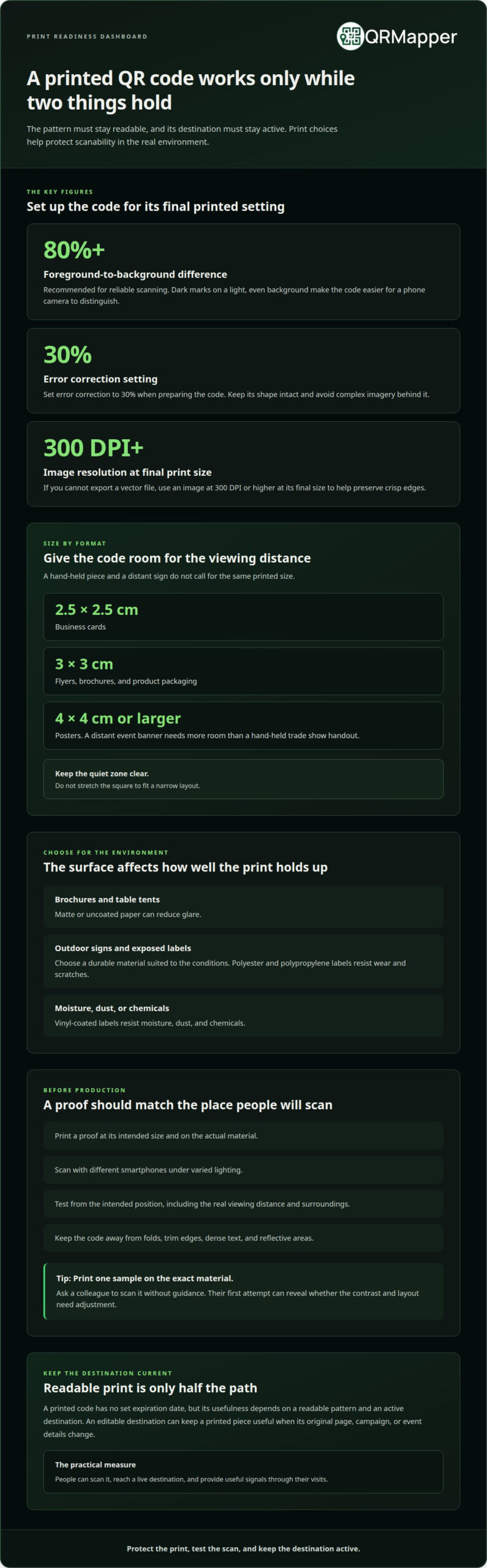
Start by considering where the printed piece will be used. Matte or uncoated paper can reduce glare on brochures and table tents. For outdoor signs or labels exposed to weather, choose a durable material suited to the conditions. Polyester and polypropylene labels resist wear and scratches, while vinyl-coated labels resist moisture, dust, and chemicals. A surface that holds up helps the code stay readable.
Size the code for its format and scanning distance. Business cards can use a 2.5 × 2.5 cm code, while flyers, brochures, and product packaging can use 3 × 3 cm. Posters can use 4 × 4 cm or larger. A code on a distant event banner needs more room than one on a hand-held trade show handout. Keep the quiet zone clear, and never stretch the square to fit a narrow layout.
Contrast affects whether a phone camera can distinguish the code from its background. Use dark marks on a plain light background. Choose the error correction level for the environment and code size, preserve the square shape, and avoid complex imagery behind it. These choices support readability, but they cannot compensate for a damaged or obscured print.
A QR code watermark can support document traceability if it links to a document-specific record or verification page. For example, a printed certificate or internal form can include a subtle code linked to its corresponding record. Make sure the watermark stands out from the page texture, with sufficient contrast and clear space for scanning.
What is the minimum resolution and file format for printing a QR code? Export it as a vector file when possible, or as an image at 300 DPI or higher at final print size. A crisp file helps preserve the code’s edges when it is scaled for a brochure or sign.
How do I test a QR code before printing materials? Print a proof at its intended size, then scan it with different smartphones under varied lighting. Test it on the actual surface and in its intended position, whether that is a glossy menu or an outdoor sign. A screen preview alone is not enough.
Where should I place a QR code on a printed page? Position it beside the relevant instruction or offer, such as event registration details or a menu’s ordering note. Leave clear space around it, and keep it away from folds, trim edges, dense text, and reflective areas that might obstruct scanning.
2. Contrast and scan readability
A QR code can remain physically intact and still fail during a scan. Contrast helps a phone camera distinguish the dark modules from the background, especially on a busy event banner or a menu with colored backgrounds.
For reliable scanning, use a dark code on a light, even background. Black on white provides a clear distinction; pale gray on cream or dark blue on black does not. You can use your brand palette elsewhere on the page, but keep the code area visually simple.
Check the printed result, not just the design file. A code that looks sharp on a bright monitor may lose definition in print. Ink spread, paper texture, and a smaller reproduction size can soften the squares. Inspect the final proof at its intended size, including the edges and the clear space around the code.
Gradients and photos can create uneven backgrounds. A code over a hotel lobby image may blend into a dark doorway, while the same code can scan clearly on a plain panel. Keep logos, headlines, and decorative patterns outside its clear area. Don’t stretch the code to fit a narrow column, because distortion changes its shape.
Reflections can also reduce contrast. A glossy table tent under overhead restaurant lights may reflect the room across the code. A matte finish can reduce glare, while an outdoor sign should be positioned to avoid direct reflections. Test the material in its real setting, not just in a screen mockup.
Lighting affects what a camera can read. A code on a garage entrance sign may scan easily in daylight but be harder to read in dim evening light. Check the printed piece in the conditions people will encounter, including shadows, overhead lighting, and the distance from which they approach.
Test the proof with more than one phone. Scan it on different smartphones, under varied lighting, and from the intended viewing position. If a device needs repeated focusing or unusually close positioning, adjust the contrast, size, or placement before approving the print run.
Tip: Print a sample on the exact paper or sign material, then ask a colleague to scan it without guidance. Their first attempt will show whether the code is immediately legible or whether its contrast and layout need adjusting.
3. Dynamic QR codes and editable destinations
A dynamic QR code separates the printed pattern from the page it opens. The code uses a managed redirect to send scans to the current destination. If a hotel changes its booking page, for example, it can keep the same code on its brochures and update where the code leads.
A static code embeds one destination directly. If a restaurant moves its menu page or the original domain expires, the code still points to the old address. The page may be gone even when the table tent remains in good condition. Physical durability does not keep a changing web destination up to date.
Editable destinations are useful when printed materials outlast a campaign’s original plan. An event banner can direct guests to registration before the event, then to the schedule once it begins. A real estate sign can point to a property listing, then redirect to the agent’s current listings after the home sells. The printed pattern stays the same while its purpose changes.
For long-lived packaging or shelf talkers, review the destination regularly. Confirm that the page loads, its information matches the product, and the next step is still relevant. A product page that no longer reflects current details can weaken trust, even when scans reach it successfully.
Plan the destination before printing. Choose a durable landing page instead of a temporary campaign page, then assign someone to manage updates. For a trade show handout, for example, a campaign manager could replace the event-specific page after the show. Clear ownership helps prevent outdated offers or registration details from lingering.
One code can also serve a sequence of planned destinations. A venue might use the same printed sign for event information before opening and visitor guidance during the event. Scheduled redirects can make the transition deliberate, without requiring new signs for each phase. Align the timing with the audience’s needs and the sign’s location.
Editable routing does not fix damaged print or guarantee that every destination is suitable. It addresses a different problem: the gap between a durable printed code and a changing digital page. If a brochure is unreadable, correct the print. If its page has moved, update the destination without replacing the brochure.
Set a simple review routine: identify long-running printed pieces, confirm their destinations, and assign an owner to manage future changes. This gives each code a clear role after printing instead of leaving its usefulness tied to an old campaign link.
4. Scan analytics for printed codes
A scan count shows whether a printed piece attracts attention, but not what to change next. For a sign, scan analytics can show when and where people engage, helping you assess whether its placement and timing suit the audience.
Time patterns can help you understand how a campaign performs. An event banner may draw scans before opening, while a sign at a garage entrance may see activity during arrival periods. Compare scan times with the campaign calendar to see whether the code supports the intended moment.
Location data can help distinguish placements, but each placement needs its own trackable code. Use separate codes in a newspaper, magazine, and billboard, all leading to the same page. Their scan activity can then show which channel prompted more visits, rather than combining the results into one total.
Keep the measurement question specific. For a hotel brochure, ask whether scans come from the lobby or a trade show handout. For a restaurant table tent, compare activity across dining locations. A clear question makes the report useful and ties the data to a decision.
Scan data can guide practical changes. If people scan a printed offer but the campaign page has changed, update the destination and keep the code in use. If one channel draws little activity, review its placement, audience, and timing before repeating the print plan.
What accessibility and privacy rules apply to QR codes in printed advertising? Make scanning optional by providing a readable alternative, such as a short instruction or contact method, and ensure the destination works with assistive technology. Explain what scan information is collected and why, and limit collection to what the campaign needs.
Use this review sequence for a printed campaign:
- Assign a distinct code to each print channel or placement you want to compare.
- Record the campaign dates and the intended audience for each piece.
- Review scan counts, times, and locations alongside those campaign details.
- Use the pattern to adjust placement, timing, or the destination for the next run.
Scan analytics can include location, scan time, and device type. Treat each signal as context, not a complete account of a visitor. For example, more scans near an event venue may suggest that its banner is being noticed, but that alone does not explain why people scanned or what they did afterward.
Tip: Before your next print run, give each channel its own code and write down the question its scan report should answer. This makes the results easier to interpret when the campaign ends.
5. How do I create a QR code for print?
We prepare the destination, code file, and physical proof before approving a print run. That sequence helps us catch practical problems while a menu, event banner, or direct-mail piece is still being reviewed.
We use these steps to move from the intended action to a print-ready code:
- Choose the destination. We decide what the reader should reach, such as a menu, registration page, property listing, or product information. Then we open that page on a phone and confirm it matches the printed message.
- Decide whether the destination may change. If an event banner will serve more than one campaign phase, we use an editable destination. If the page and address are stable, a direct destination may suit a short-lived handout.
- Create the code from the final destination. We use a distinct code for each print channel when we need separate performance results. For example, a magazine advertisement and a trade show handout can lead to the same page while remaining separately identifiable.
- Export for the final dimensions. We choose a vector file when available, or an image file at 300 DPI or higher at final print size. This helps retain clear edges when the code goes into a brochure or onto packaging.
- Place it without crowding. We leave a clear quiet zone around the code. Logos and text stay outside that margin, and we preserve the square’s proportions instead of stretching it into a column or label.
- Proof the actual print. We scan a sample at its intended size and on the chosen material. We test with different smartphones and lighting, then confirm the scan reaches the intended page.
Choose an error correction level suited to the print environment. Higher levels add redundancy and can increase code density; they do not guarantee scanning through any particular amount or location of damage. Error correction cannot replace a clean print and an unobstructed margin. We keep the background plain and the code’s geometry intact.
For a table tent, test the code under restaurant lighting and from a seated position. For an event banner, scan it from the expected viewing distance. The proof should reflect how people will encounter the printed piece, not just how it looks on a screen.
Before release, we assign an owner to the destination and record where each version will appear. That gives our team a clear reference when a menu changes or an event page is replaced. If you’re preparing a print project, Create a permanent QR home.
QRMapper: QR Code Management
QRMapper helps teams manage printed codes as campaign details change. Its QR Code Management and analytics help you see how scans perform and keep destinations aligned with the current purpose of each piece.
For example, an event banner can direct guests to registration before the event, then to event information when plans shift. Separately tracked codes can also help a team compare print placements without changing the destination page.
Give every printed code an owner and a next step
Decide who will keep each code aligned with your work as campaigns and customer needs change. Assigning an owner makes maintenance part of the process, rather than waiting until someone finds an outdated page.
Give that owner a clear reason to review the code, such as a campaign change, product update, or new customer instruction. They can update its destination, keep the current path, or retire the printed piece. Regular reviews help your materials continue to serve their intended purpose.
With a clear owner and a regular review habit, your team can keep printed materials connected to current priorities. Put QRMapper to work managing your codes and destinations as those priorities change.
Frequently Asked Questions
How long do QR codes last?
A printed QR code has no automatic expiration date. Its useful life depends on whether the pattern remains readable and the destination is available. A static code may still scan after a campaign ends, but it continues to point to its original address. For a code on a long-term sign, keep the destination current and check the print for fading, scratches, or damage.
What Is the Best Color for QR Codes in Print?
Use a dark code on a light background, such as black on white. A camera needs a clear distinction between the pattern and its surroundings. Avoid light patterns on dark backgrounds, subtle color combinations, and patterned images behind the code. Scan the color proof in the lighting where people will use it, such as under restaurant lights or at a shaded outdoor entrance.
What materials work best?
Choose a material suited to the setting and expected handling. Uncoated paper can reduce reflections on a brochure or menu, while a weather-resistant label is better for an outdoor product or sign. Curved or glossy surfaces can make scanning harder, so test the finished piece after lamination or coating. On packaging, place the code on a relatively flat panel, away from folds and rounded edges.
Why doesn’t my QR code work when printed?
Common causes include printing the code too small, low contrast, distortion, glare, or text and artwork crowding its clear margin. First, scan a clean proof with a phone camera. If the phone recognizes the code but the page does not load, check the destination and its internet connection. If the camera cannot recognize the pattern, review the print size, quiet zone, and surface.
What are QR codes used for in printed materials?
QR codes connect a physical item to a useful digital next step. A restaurant menu can open an ordering page, direct mail can lead to a promotion, and an event program can point guests to registration or schedule details. QR codes for printed materials can also lead to a survey, product information, or a related video, depending on what the audience needs.
What size should a QR code be on a printed flyer or brochure?
A 3 × 3 cm code is a practical recommendation for flyers and brochures. The right size also depends on how far away a person will scan it from: a hand-held brochure can use a smaller code than a large sign viewed across a room. Leave enough clear space around the pattern, and test a print proof at its final dimensions before production.
Are free QR codes permanent or do they expire?
A QR code pattern does not expire on its own, but a free service may affect whether its destination continues working. A static code points directly to the address encoded in it; if that page moves, the code still points to the old address. A managed code relies on the service behind its redirect, so review that service’s terms and keep the destination active.
What design choices make printed QR codes easier to scan?
Keep the code square, use a dark pattern on a light, plain background, and leave an empty margin around it. Don’t place a logo, headline, or decorative border over the pattern or within its clear space. Position the code beside the relevant instruction, such as an ordering note on a menu. Test the printed version on several phones before approving the full run.
For technical guidance, see DENSO WAVE’s explanation of the four-module quiet zone and choosing an error correction level. Review our print-ready QR code checklist, then explore QRMapper with a 14-day free trial.