
Your team has printed event badges, but registration details change before they reach the venue. Bulk dynamic QR code generators with API access can connect batch creation to a workflow that keeps those codes manageable afterward.
For packaging, event materials, or campaigns across locations, code count alone will not tell you whether a tool fits. Consider how it handles records, integrations, and code-level reporting as your needs change.
This guide compares tracking, API access, software integrations, and batch workflows. You’ll see what to assess before codes go onto a yard sign, handout, or package, and how to choose a setup that fits your team.
Key Takeaways
- Compare tools by how they manage destinations after printing, not just how quickly they create a batch.
- Look for scan reporting that helps you understand which individual codes and channels are performing.
- Assess whether API access and software integrations fit the workflow your team already uses.
- Test a sample batch and its exported files before committing codes to packaging, signage, or event materials.
- Use the decision guide to match batch volume and management needs to the right kind of platform.
What to Look for in a Bulk QR Code Generator?
Choose a tool based on code type, destination control, export formats, and batch workflow. For packaging or event materials, these factors determine what happens after printing.
Bulk Code Generation
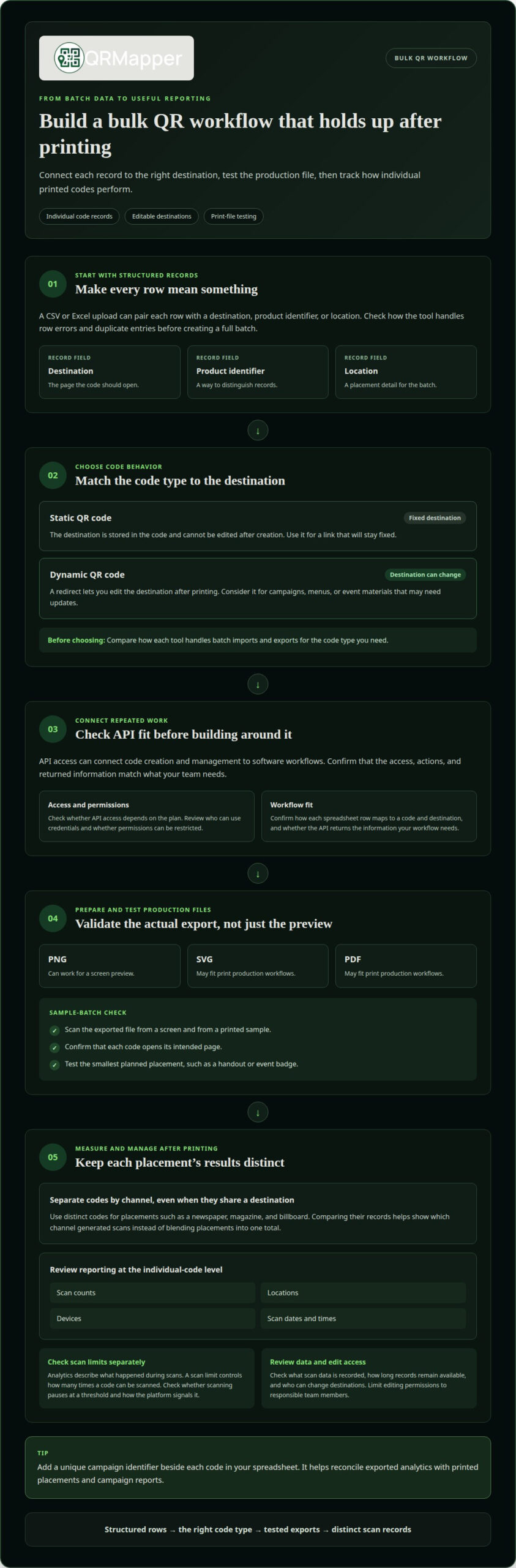
Bulk generation creates multiple static or dynamic QR codes from structured data. A CSV or Excel upload can pair each row with a destination, product identifier, or location. Static codes suit fixed destinations; dynamic codes suit campaigns that may change. Compare how tools handle row errors, duplicate entries, and the distinction between static and dynamic codes.
Editable Destinations
A static QR code stores its destination in the code itself. If a yard sign points to a property page that later moves, the printed code still leads to the old address. A dynamic code uses a redirect, so you can change the destination without replacing the printed code. Choose dynamic codes when a menu, event banner, or product insert needs to stay useful through updates.
Formats and Branding Options
Bulk QR code generators may export codes as PNG, SVG, or PDF files. PNG can work for a screen preview, while SVG or PDF may fit print production workflows. Which QR code formats, customization options, and branding features does the tool support? These options vary, so compare them before choosing a batch workflow. Branded styling should remain readable on the actual material.
Test each export before putting codes on packaging or event badges. Scan the file from a screen and a printed sample, then confirm that it opens the intended page. Test the smallest planned placement too: a code that scans on a monitor may be harder to scan on a handout.
Security and Data Retention Risks
Dynamic codes add a redirect layer, so review who can change destinations and what scan data the platform records. Security, privacy, and data retention depend on access controls, collected information, and how long records remain available. For a gated event document, limit editing permissions to responsible team members. Review data controls before using codes on materials tied to customers or employees.
| Option | Destination changes | Batch workflow | Useful for |
|---|---|---|---|
| Static QR codes | Not editable after creation | CSV or Excel import may be available | Fixed links |
| Dynamic QR codes | Editable through a redirect | Compare import and export handling | Campaigns that may change |
| Dynamic codes with API access | Editable through a redirect | Can connect code creation to software workflows | Repeated or integrated batches |
Choose static codes for fixed destinations and dynamic codes when printed materials need destination changes. Compare file handling before committing to a batch.
Dynamic QR code tracking and analytics
Scan analytics turn printed codes into a record of how each placement performs. For U.S. campaigns, explain what scan data you collect and why. Transparency is a sound practice, but it does not replace applicable requirements.
Scan Limits
A scan limit controls how many times a code can be scanned; analytics describe what happened during those scans. Compare these separately. A yard sign may need to keep working over time, while an event handout may serve a defined campaign. Check whether the platform pauses scans at a threshold, how it signals that, and how long analytics remain available.
For a batch with hundreds of codes, distinguish a limit per code from an account-wide limit. A spreadsheet can help track each code’s purpose, but it cannot show whether a platform has paused scanning. Check scan status in the dashboard alongside scan counts, especially before distributing event badges or packaging.
Campaign Tracking Requirements
Tracking is most useful when each code answers a specific campaign question. Assign separate QR codes to a newspaper placement, magazine ad, and billboard, even if they all lead to the same page. Comparing the codes helps identify which channel generated scans instead of blending every placement into one total.
For a U.S. campaign, tell people what scanning the code does, and avoid collecting information unrelated to that purpose. Organize campaign records by code, channel, and destination. This makes reporting easier and clarifies how a table tent or trade show handout performed.
Bulk analytics should retain a separate record for each code, not just a batch-wide total. Useful reporting can include scan counts, locations, devices, and scan dates and times. A store manager can compare locations, while a marketing lead can compare channels without treating several codes as one campaign result.
A QR code scan analytics API can feed those records into a reporting workflow. Match the information your team needs to the data the API returns. For example, connect each scan record to its code identifier and campaign. Then choose how to review results: a dashboard may suit campaign monitoring, while an exported spreadsheet can support periodic reviews across placements.
Tip: Add a unique campaign identifier beside each code in your spreadsheet. This helps reconcile exported analytics with printed placements and campaign reports.
API access and software integrations
An API connects QR code creation and management to the systems your team already uses. Compare plan access, supported actions, and returned information before building an integration.
Plan-Based API Access
API access may depend on the plan, so treat it as a core requirement. Some platforms reserve it for paid plans. A marketing lead planning a recurring campaign should confirm that the selected plan supports the required API functions, not just code creation. Also review who can access credentials and whether permissions can be restricted.
Assess plan access and integration fit separately. A platform may offer an API, but your workflow still needs compatible authentication, clear documentation, and usable responses. For example, a team connecting a campaign spreadsheet needs to understand how each row maps to a code and destination. Those details determine whether the integration reduces manual work.
API Automation
Automation helps when QR code creation follows a repeatable business event. A product system might create a code when someone adds an item record, while an event workflow might prepare codes for registrations. The API should fit that sequence and return identifiers your team can match to records. Otherwise, staff may still need to reconcile codes by hand.
Map the process before implementation. Identify which system starts the task, what data it sends, and what result it needs back. For a hotel campaign, that could mean linking a room-offer record to its assigned code. Test one end-to-end workflow before extending it to a broader campaign.
Creating and Managing Dynamic Codes
API features vary by platform. What actions can the API perform to create, edit, and manage dynamic QR codes? Check the documentation for methods to create codes, change destinations, retrieve code details, and manage access. An API that only creates codes may not support the later edits your printed materials require.
Use a clear code identifier in each system. For example, connect a trade show handout code to its campaign name and destination record. This makes it easier to find the right code when a page changes. Confirm that edits apply to the existing dynamic code, rather than creating a replacement file that must be printed again.
Before building, compare the API’s actions with the full lifecycle of a code: creation, destination updates, retrieval, and permission management. Then assess whether analytics can feed the reporting tools your team uses. This helps determine whether an integration supports ongoing campaign work or only initial creation.
- Match API access to the plan and user permissions.
- Test a single record from creation through destination editing.
- Confirm that identifiers connect codes to campaign records.
Branded QR codes still need a reliable link between the printed item and its record. A well-designed integration preserves that connection across systems, so staff can manage destinations and interpret campaign results without losing track of each code.
Batch generation by volume
Batch volume changes the work involved in creating QR codes, not just the number generated. A packaging run, event badge system, and inventory project each need different input fields, identifiers, and review steps. Compare how a platform handles the full batch: importing records, creating codes, organizing outputs, and catching errors before print production.
Match batch features to the source data
A spreadsheet is useful when each row represents a separate item, location, or campaign placement. Check whether the platform accepts CSV or Excel uploads and maps each row to its destination. For a retail product, keep the product ID connected to its code. For a real estate brokerage, each property record may need its own destination and identifier.
Organization matters as volume grows. A tool may group generated codes into folders or provide a ZIP file for batch downloads. Compare these options with your handoff process. A marketing team sending files to a print vendor needs to preserve the connection between each code and its product or placement, not just receive a folder of images.
Scale processing without losing control
Batch processing can fail quietly: a blank destination, duplicate identifier, or row mapped to the wrong campaign. Before committing to a large run, review how the platform reports skipped or invalid records. A clear error report lets staff correct the source spreadsheet instead of searching finished files for a missing code.
For example, a project might need 100 QR codes for product packaging, 500 for event badges, or 1,000 for inventory tracking. These examples show how requirements can shift with volume and purpose. Packaging needs a reliable product-to-code match; badges need individual records; inventory needs a consistent identifier across the batch.
Test the batch before print production
Do not treat a completed export as proof that every code works. Select records from the beginning, middle, and end of the batch, then scan them and compare them with their source entries. For example, match an inventory label’s code to its product record. This catches ordering or mapping problems before files reach labels or packaging.
Separate a large job into meaningful groups when locations, products, or campaign phases need different handling. A hotel team could organize codes by property, while an event team could separate badge records from venue signage. Grouping clarifies review and distribution, and gives teams a practical way to measure results by unit of work.
Tip: Add a unique identifier and destination column to your source spreadsheet before importing. Then test a small sample from each group and compare every scan with its corresponding row.
Choose a platform that preserves the connection between each record and its code through creation, export, and review. Batch volume matters, but reliable mapping makes the generated set usable in the field.
Bulk QR code generation APIs
Providers of bulk dynamic QR codes with API access differ in batch creation, destination management, branding, and analytics access. Compare the full workflow, from sending records to retrieving codes and scan data, rather than judging an API by code creation alone.
An API is most useful when it keeps each printed code connected to its business record. For a product label, that record might include a stock identifier, destination, and campaign name. For an event banner, it might connect the printed code to the event page and reporting group. The API should make these relationships clear in the data it accepts and returns.
Batch creation is one point of comparison. Check whether the API accepts multiple records in one request or requires a separate request for each code. Then examine how it reports incomplete or invalid entries. A response that identifies the affected record helps staff correct source data without rebuilding the entire batch.
Destination management is another distinction. A dynamic code should remain connected to its assigned record when its destination changes. For example, a hotel could update an offer page while keeping the code on a room card. Check whether the API supports both creation and later edits, and how it identifies the code being changed.
Branded output needs its own review. Some teams need codes that reflect established brand colors, while others prioritize consistent files for print production. Compare which branding settings can be applied through the API and whether generated files match the manual workflow. Styling should never obscure the destination or break the connection to its source record.
At large scale, organization matters. A retailer deploying branded codes across many stores needs a distinct code identifier for each location. This illustrates why identifiers matter: a batch should help a team distinguish placements, rather than produce an undifferentiated collection of images.
Analytics access distinguishes code-generation endpoints from broader management workflows. Check whether scan data can be retrieved through the API and linked to the same code identifiers used during creation. A marketing team can then compare placements in its reporting system. Without that connection, staff may have to match scan records against a separate spreadsheet.
Compare providers by testing the same workflow:
- Send records with distinct identifiers and destinations.
- Review generated codes and error responses.
- Change one destination and retrieve its updated record.
- Connect available scan data to the original identifiers.
This comparison shows whether an API supports ongoing code management or only initial generation. Choose a workflow that keeps each printed code tied to a record your team can maintain.
Branding options can include established brand colors and consistent files for print production. Check whether the API supports those settings and whether generated files match the manual workflow.
QRMapper: QR Code Management
QRMapper helps teams manage printed codes after creation, as destinations and campaign needs change. If a yard sign, menu, or event banner must keep working through updates, QR Code Management lets you change the destination without replacing the printed code.
Scan analytics show scan timing, unique versus repeat visitors, device type, browser, and country. The data is anonymized and uses daily hashes, not stored personal visitor data. QRMapper includes API access on paid plans. It fits teams focused on managing deployed QR codes and understanding scan activity, rather than simply generating a batch of files.
If you’re ready to consider managed QR codes for your printed materials, visit QRMapper.
Set up your next QR campaign with the long view
Printed materials can remain useful after a campaign changes. Before choosing a bulk dynamic QR code generator with API access, map how your team will maintain destinations, review scan results, and connect codes to existing records. That operating plan matters as much as the initial batch.
QRMapper brings QR Code Management, Digital Marketing, and analytics together for teams responsible for printed campaigns. Consider it when you need a practical way to manage deployed codes and understand scan activity. Start with a campaign workflow, identify who owns its codes, and decide what information your team needs to guide the next update.
We can help you consider the right approach for your QR needs. Contact QRMapper about your QR needs, and take the next step with a clearer plan for your printed materials.
Frequently Asked Questions
What is a bulk dynamic QR code generator with an API?
A bulk dynamic QR code generator with API access creates many codes through software requests, then lets a connected system manage them. Each code can point to a destination that changes without changing the printed pattern. For example, a packaging database could connect a product record to its code, making later destination updates easier to manage across printed materials.
Which services offer bulk dynamic QR code generation APIs?
QR code management platforms may combine batch creation with API access, destination editing, and scan reporting. Compare the API actions and workflow support rather than relying on a “bulk” label alone. QRMapper’s REST API uses Bearer API keys and supports creating, updating, deleting, and listing codes on paid plans, helping teams manage printed materials through connected software.
How do bulk QR code generator APIs support CSV or spreadsheet imports?
CSV or spreadsheet imports organize records into rows that can map to code details, such as an item identifier and destination. Some workflows import files through a platform interface; an API connects records directly from another system. For a catalog update, preserve the same product identifier in both places so staff can trace each code back to its source record.
How much do bulk dynamic QR code generator APIs cost, and what are the plan limits?
Costs and limits depend on the service and plan, so compare what matters to your workflow: API access, code management, analytics history, collaborators, and destination controls. QRMapper includes API access on paid plans. Review the current plan details before choosing, especially if your team needs API functions or longer analytics retention. Match the plan to the work you expect to manage.
How do dynamic QR codes track scans and provide analytics?
Dynamic QR platforms can associate scan activity with individual codes, helping teams review when and where scans occur. QRMapper analytics include scan timing, unique versus repeat visitors, device type, browser, and country. The data uses anonymous daily hashes, not stored personal visitor data. For a direct-mail campaign, connect each code to its mailing segment to interpret results without combining every placement into one total.
How do I integrate a bulk QR code API into an app or workflow?
Start by identifying the system that should trigger code creation, such as an inventory app adding a product record. Use the API credentials and documentation to connect that event to a code request, then store the returned code identifier with the original record. Test destination updates and error handling before expanding the workflow. QRMapper’s REST API uses Bearer keys and supports code creation, updates, deletion, and listing.
Explore QRMapper with a 14-day free trial. For more background, read our guide to bulk QR codes and API workflows.