
A table tent should do more than point to a menu. QR codes for restaurant table tents can connect guests to menus, promotions, social pages, and other useful destinations. With a dynamic code, you can change the destination without replacing the printed tent. A static code, by contrast, keeps directing guests to the address encoded when it was created.
The menu is often the first thing guests need, but it doesn’t have to be the only thing a table tent offers. A well-chosen destination helps guests and gives your restaurant a clear way to share timely information.
We’ll walk through practical ways to use a table tent beyond menu access, explain the difference between static and dynamic codes, and show when to generate a code. We’ll also cover the setup choices that help a printed code remain useful after it reaches the table.
Key Takeaways
- Choose one clear purpose for each table tent code, then direct guests to a menu, promotion, or other useful page.
- Use a dynamic code when you may need to update its destination without replacing printed tents.
- Protect scan reliability by paying attention to contrast, clear space around the code, and how it appears on the printed tent.
- Generate the code after its destination is ready, and test the printed version in the setting where guests will use it.
- Use scan analytics to understand when and where guests engage, then decide what information deserves a place on the table.
1. Consolidating menus and marketing information
A table tent can connect key steps of a meal to one useful destination. Guests commonly need to view the menu, order, and pay. One QR code can open a mobile page that organizes those actions, rather than making guests find separate links. For example, a café could put its current menu, online ordering, and payment instructions on one landing page.
Keep the destination focused, even if it offers several options. Put the food and drink menu first, followed by clear links to ordering, payment, and details such as opening hours. A brunch restaurant might feature its weekend menu at the top, with its catering page below. This puts guests’ immediate needs before promotions for another occasion.
Some menu updates may be handled without changing the printed table tent. A dynamic QR code keeps the printed pattern unchanged while you update its destination. When dishes or hours change, update the page behind the code. QRMapper’s dynamic codes can direct guests to a current menu, and on Pro and Business plans you can use your own custom domain for the code’s link.
Make dietary details part of the menu, not a separate puzzle. For a roasted vegetable bowl, for example, provide a readable description and clearly organized allergen or dietary information on the linked page. Keep those details current alongside the dish description. If guests need to download a menu, offer a legible file and retain an online version that’s easy to open on a phone.
Accessibility obligations for restaurant digital services in the United States can depend on the service and context. Make the menu usable beyond the QR code: provide readable text, clear headings, and a way to request the menu without scanning. These options can help guests who use assistive technology or don’t have a smartphone ready.
QR codes can expose guests to altered stickers, misleading destinations, or pages that collect unnecessary personal information. Point codes to a restaurant-controlled destination, inspect table tents for replacement stickers, and keep sign-up forms limited to necessary details. A menu scan, for example, shouldn’t unexpectedly lead to a form requesting contact information.
Ordering and payment are distinct steps for guests, even when one menu page connects them. Label each option clearly and direct payment to the restaurant’s intended service. A table tent can also link to social media, but keep that option secondary to the menu and ordering page. One clear route is easier to follow than a collection of competing destinations.
2. How do table tents with QR Codes provide more than just menu access?
A table tent earns attention when the code works and the next page offers a clear action. Guests might scan to see a special, follow a social account, or join a loyalty program. Match the printed prompt to the destination. “Scan for today’s special” should open that offer, not a general page guests have to search.
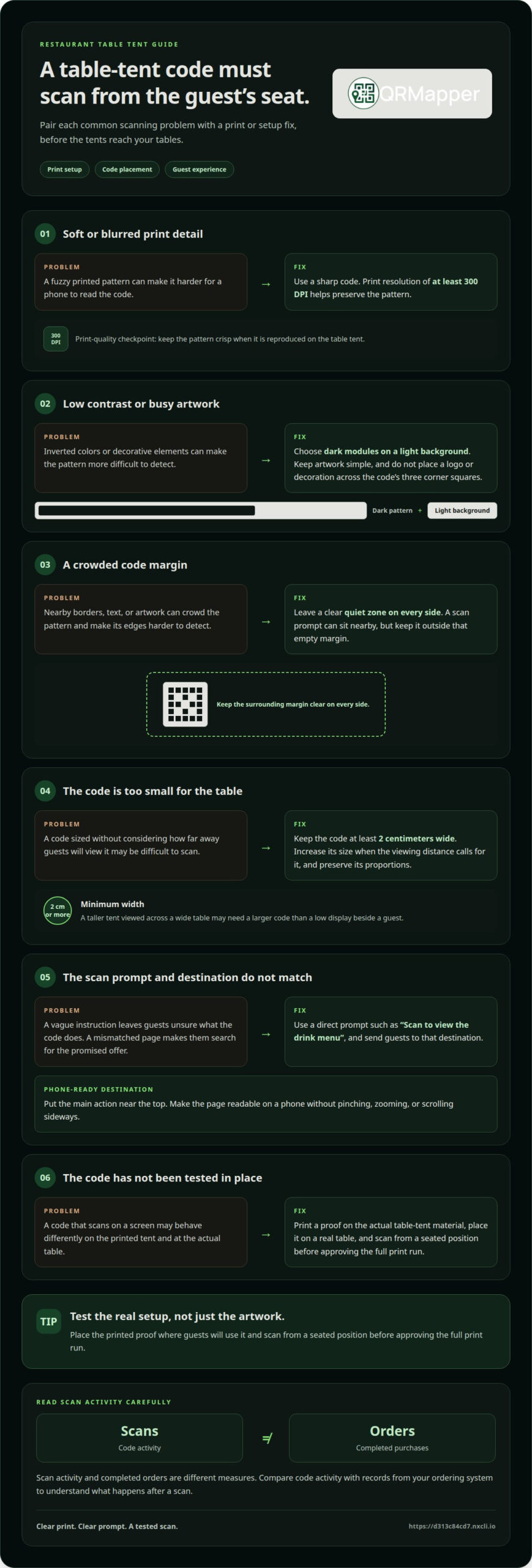
Print quality begins with a sharp code and strong contrast. A resolution of at least 300 DPI helps preserve the pattern in print. Dark modules on a light background are easier for many phones to read than inverted codes. Keep the artwork simple, and avoid placing a logo or decorative element across the code’s three corner squares.
Leave a quiet zone around the pattern. This empty margin separates the code from nearby borders, text, and artwork, helping phones detect its edges. Keep the margin clear on every side, even when placing the code in a printed frame. A “Scan for dessert” prompt can sit nearby without crowding the pattern.
Size the code for the distance between the table tent and a seated guest. Keep its width at least two centimeters, and increase it when the viewing distance calls for a larger code. A tall tent viewed across a wide table may need a larger code than a low display beside a guest. Preserve the code’s proportions in the layout.
Give guests a direct scanning instruction. “Scan to view the drink menu” tells them what the code does before they point a phone at it. If a code promotes social media, name that purpose instead of showing a bare square. Clear wording helps guests decide whether the destination is relevant.
The landing page should load on a phone and make its main action easy to find. A page promoting a lunch special, for example, can put the details and ordering option near the top. Don’t make guests pinch, zoom, or scroll sideways to read the offer.
Analytics can show scan activity, but scans and completed orders are different measures. Compare code activity with records from your ordering system to understand what happens after a scan. With a dynamic code, you can also update the destination when an offer changes without changing the printed pattern.
Tip: Print a proof on the actual table tent material, place it on a real table, and scan it from a seated position before approving the full print run.
3. Static versus dynamic QR codes
A static code fixes its destination when created; a dynamic code lets you manage the destination later. For QR codes for restaurant table tents, that difference matters when a menu address changes, a seasonal campaign ends, or ordering moves to another page. Choose based on how likely the destination is to change and whether scan information is useful to your team.
A static QR code stores its destination in the pattern. If it points to a restaurant’s menu page, the code opens that address. But if the page moves or the domain expires, the printed code may lead guests nowhere useful. Changing the destination requires creating and printing a replacement code.
A dynamic QR code points to a managed redirect that sends guests to the current destination. Keep the same code on the tent while changing its destination from a lunch menu to a holiday menu, for example. With a managed QR code, you may be able to update the destination while keeping the printed table tents in use.
Dynamic QR codes can also provide anonymized scan analytics, including time, device type, browser, and country. This can help your team compare activity across table tents in different dining areas. Scan counts indicate code engagement, while completed orders or campaign actions need to be measured on their respective pages.
Use a static code for a stable destination that doesn’t need ongoing management. A downloadable PDF at a lasting address may suit a short print run. Choose a dynamic code when one printed design needs to support changing menus, ordering pages, promotions, or campaigns with distinct phases.
Before creating either type, settle the destination and the code’s purpose. If you’re promoting a seasonal dish, decide whether guests should see the menu, an ordering page, or campaign details. Then create the code, scan it with a phone, and confirm that the landing page matches the printed instruction.
Start customization with the destination and purpose, not decoration. Name each dynamic code for its placement, such as “Main dining room table tent” or “Bar specials tent.” Clear names help your team identify which printed asset generated scans when several codes point to the same campaign page.
For QR codes for restaurant table tents, a managed code can redirect guests when your restaurant changes platforms or reorganizes its menu. The same printed code can point to a new promotion when the previous campaign ends. A static code is suitable when the address is stable and destination changes or scan analytics offer little value.
Decide before printing: static codes suit fixed links; dynamic codes suit destinations that need ongoing management and measurement.
4. Generating QR codes when a menu is published
Create the table tent code once the menu destination is ready, not while it’s still changing. If your team publishes a spring menu on a new page, confirm it works on a phone before creating the code. This keeps the printed instruction, code, and guest destination aligned from the start.
First, decide what the scan should do. A tent beside a dining room menu could open the current menu, while a bar tent might promote drink specials. If the goal is loyalty, send guests to the specific sign-up page instead of a general homepage. Match the code’s purpose to its placement and the action you want guests to take.
Next, confirm the destination with the person responsible for publishing the menu. A marketing lead, for example, can make sure the lunch menu is live, the ordering button works, and seasonal dishes appear correctly. Check that guests can read the page without signing in to staff accounts or navigating an internal content system.
Then create the QR code for the chosen destination. Give it a useful internal name, such as “Patio lunch menu” or “Bar loyalty offer,” so your team can find it later. If different table tents serve different areas, distinct names help staff connect scan activity to the right printed placement.
Before printing, scan the generated code with a phone and follow the complete guest journey. Open the menu, select an ordering option, and check that the next page loads as intended. If the code leads to social media, verify that it opens the restaurant’s intended account. Test the live destination, not just the image in a design file.
Once the test succeeds, place the code beside a direct instruction, such as “Scan to view the dinner menu.” Print a proof on the intended table tent material, then scan it under the lighting and viewing angle guests will encounter. A screen test alone can’t show whether the finished piece is easy to scan in a dim dining room.
Plan menu changes around the destination, not just the printing schedule. When the kitchen publishes a revised menu, update the linked page and confirm that the ordering path still works. For a seasonal dish promotion, assign an owner and an end date so guests aren’t sent to an outdated offer.
Keep a simple record of each code’s placement, destination, and owner. A restaurant group could note which tent serves the patio, which page it opens, and who updates that page. The record gives staff a reference when a scan reveals a problem or the menu changes. Create the code only after the destination is ready, then test the printed tent before putting it out for guests.
5. Benefits of QR codes on restaurant table tents
A table tent can turn an idle moment into a useful next step. A scan might open the dinner menu, show a daily special, or take someone directly to an ordering page. Match the destination to the moment: a lunch tent should make lunch options easy to find, not bury them beneath unrelated promotions.
One code can help guests move from browsing to ordering without waiting for another printed menu. A diner can scan a QR code table tent, review the menu on a phone, and choose the restaurant’s ordering option. Staff can still guide guests who prefer to order aloud, while the digital route gives others another way to view the menu.
Table tents also provide a dedicated space for restaurant marketing. One tent can promote a weekday special, while another invites guests to follow the restaurant on social media. Keep each piece focused on one action. If it says “See today’s special,” the scan should open that special directly.
Scan analytics give managers a way to assess whether guests engage with a particular tent. If scans happen during dinner service but few guests continue to an ordering page, the offer or page layout may need attention. Treat scans and completed actions as separate signals: a scan records an opening, while an order or loyalty sign-up records a further step.
Dynamic destinations keep table tents useful as menus and promotions change. A code on a patio tent can point to a seasonal menu now and a different current page later. The printed pattern stays the same, so teams can update the information without replacing every tent when a campaign ends.
Placement and wording affect whether guests notice the code. Put a tent where a seated diner can see it, and use a direct prompt such as “Scan to view the dessert menu.” For a social promotion, name the account or content guests will reach. Clear expectations make the scan feel like a choice, not a detour.
Connect each tent to one intended outcome, such as menu views, orders, special-page visits, or loyalty interest. Review scan activity alongside that outcome, then adjust the destination or message when they don’t align. A table tent works best when it gives guests a clear next step and your team a useful way to assess it.
QRMapper: QR Code Management
QRMapper’s analytics show when table tent codes are scanned and from which country. Give each dining area its own code to compare engagement across areas. Scan analytics are anonymized and include details such as time, device type, browser, and country.
With QR Code Management, you can change a code’s destination without replacing the printed tent. The same printed pattern can lead to a menu, ordering page, or seasonal promotion as your needs change. The pattern stays the same while you manage its destination.
QRMapper suits restaurants with changing menus, shared campaigns, or printed materials that need ongoing management. Dynamic QR codes let you update destinations and review anonymized scan analytics after the codes reach the table.
Make each printed code part of an ongoing plan
QR codes for restaurant table tents work best when someone owns the destination after printing. Assign responsibility for keeping the linked page current, and make each update serve a clear guest need. That small decision turns the tent from a one-time print task into a useful part of restaurant operations.
QRMapper offers QR code management and analytics for teams that need to manage printed codes and understand their use. Decide what you want your table tents to do and who will manage the destinations as menus and promotions change. Create a permanent QR home with QRMapper.
We can help you consider how QRMapper fits your restaurant’s approach to printed codes. Contact QRMapper to get started, and take the next step with a clear plan for your table tents.
Frequently Asked Questions
How do table tents with QR Codes provide more than just menu access?
A table tent can direct guests to a focused restaurant page for more than browsing dishes. A scan could open a reservation page, catering inquiry form, or the restaurant’s social page. Choose a destination that fits the guest’s moment and label it clearly. A tent promoting catering should lead to catering details, not make guests search the homepage.
Should I use a static or dynamic QR Code?
Choose a dynamic code if you may change its destination or want scan analytics. It can point to a current menu now and a holiday menu later, while the printed pattern stays the same. A static code suits a stable destination that needs no ongoing management. Before choosing, consider who will update the page and what you’ll measure.
Are QR Codes free?
QRMapper’s Free plan is free forever, requires no credit card, and includes five dynamic QR codes and seven-day analytics. Scans are unlimited and never paused or capped. Editable destinations let you keep printed table tents useful as menus and campaigns change.
Can I track which QR Code tables get the most orders?
You can compare scan activity by assigning a distinct code to each table or dining area. Analytics show engagement with each code, but a scan alone doesn’t prove an order followed. To compare orders, match each code’s placement with records from your ordering or point-of-sale system. For example, compare patio-code scans with patio orders during the same service period.
Can QR Codes on table tents drive a higher average order value?
A QR code can’t guarantee a higher check, but its destination can present relevant add-ons. A guest viewing a sandwich menu might also see a clearly described soup pairing or dessert special. Keep the suggestion connected to the meal and make ordering straightforward. Compare order records with code activity to see whether the offer is associated with completed purchases.
How do I create a QR Code on table tents?
First, publish the page guests should reach, such as the dinner menu or ordering page. Create a QR code for that destination, then add it to the table tent with a direct instruction. Before printing a batch, scan the design and a physical proof. Check the finished tent on a phone from where a seated guest would use it.
What is a table tent?
A table tent is a printed display that stands upright on a restaurant table or counter. It typically shows information on one or more visible sides, such as a special, menu prompt, or QR code. A café might place one beside the napkin holder to introduce its loyalty page. Its compact, upright format makes it easy for seated guests to notice.
What should I link my QR Code to?
Link to the page that best matches the tent’s message. A code labeled “View the dinner menu” should open that menu directly, while a loyalty prompt should lead to its sign-up page. Don’t make guests navigate a general homepage to find the promised information. Check that the page works well on a phone and stays current after printing.