

A printed QR code can keep working even when its destination changes. Dynamic QR code management lets you update the page behind a code and review scan activity without changing the printed pattern.
That matters when a campaign changes, an event page closes, or printed materials remain in circulation. Updating the destination can prevent people from landing on outdated information and save you from replacing every sign or handout.
This guide explains how dynamic codes work, how to update destinations after printing, and how scan analytics can inform campaign decisions. It also covers practical ways to organize codes across placements and teams, so you can plan what happens after each scan.
Key Takeaways
- Choose between a fixed destination and an editable redirect based on how likely your campaign details are to change.
- Use scan patterns to assess when and where printed materials are attracting attention, and which devices people use.
- Plan destination changes around campaign phases so one printed code can remain useful as the message evolves.
- Give each print channel its own tracked code when you need to compare how different placements perform.
- Before printing, test the scan journey and confirm the destination is ready for the people who will use it.
What is a dynamic QR code?
A dynamic QR code routes each scan through a managed link to its current destination. Dynamic QR code management lets you change that destination and review scan activity without changing the printed pattern.
Dynamic and static code differences
A static QR code stores its destination directly in the pattern. A dynamic code stores a redirect link, which can point to a different page later. For example, a restaurant can update a table tent’s menu destination when its online menu moves. A static code cannot be edited after printing.
A generator can create either type, but changing an already printed static code takes more than adjusting a setting. You generally need to create a dynamic code and replace the printed material, unless you control the original URL’s domain and can redirect it. In either case, the printed code itself remains static.
Dynamic QR code management also means keeping the redirect connected to a useful, current destination. For a yard sign, consider whether the linked listing page might change before choosing a code type. A static code suits a stable destination you control; a dynamic code lets you update the destination without replacing the printed piece.
Code longevity and scan tracking
A printed code can remain physically readable, but a dynamic code also relies on its redirect service staying active. A static code relies on its encoded destination, including the relevant page and domain. For either type, print quality and scanning conditions affect whether a phone camera can read the pattern.
Dynamic platforms can report scan totals, dates and times, general location inferred from an IP address, and device type. Separate codes for a newspaper, magazine, and billboard can lead to the same page while recording activity by channel. These records help distinguish placement performance from visits to the destination.
For a United States campaign, consider what scan data you collect, whether it identifies or profiles people, and which jurisdictions apply. Explain what you collect and why, and obtain consent where applicable under the laws governing your campaign.
Use scan records to guide a specific decision: compare channel activity, review when scans occur, or assess whether a campaign page needs attention. They show scan events, not necessarily a person’s identity or reason for scanning. A deliberate dynamic QR code management process starts by deciding which campaign decision each metric should inform.
Dynamic QR codes can have a less dense pattern than static codes that encode long strings of data, which may make them easier and faster to scan in some print conditions. This is a possible advantage, not a guarantee that every dynamic code will scan better than every static one. The stated benefit is limited to some print conditions, so it should be considered alongside the printed piece and the conditions in which people will use it. When choosing between code types, pattern density can be one practical consideration, while the destination’s expected stability and the need to update it remain relevant to the decision.
Campaign analytics by location, device, time, and campaign
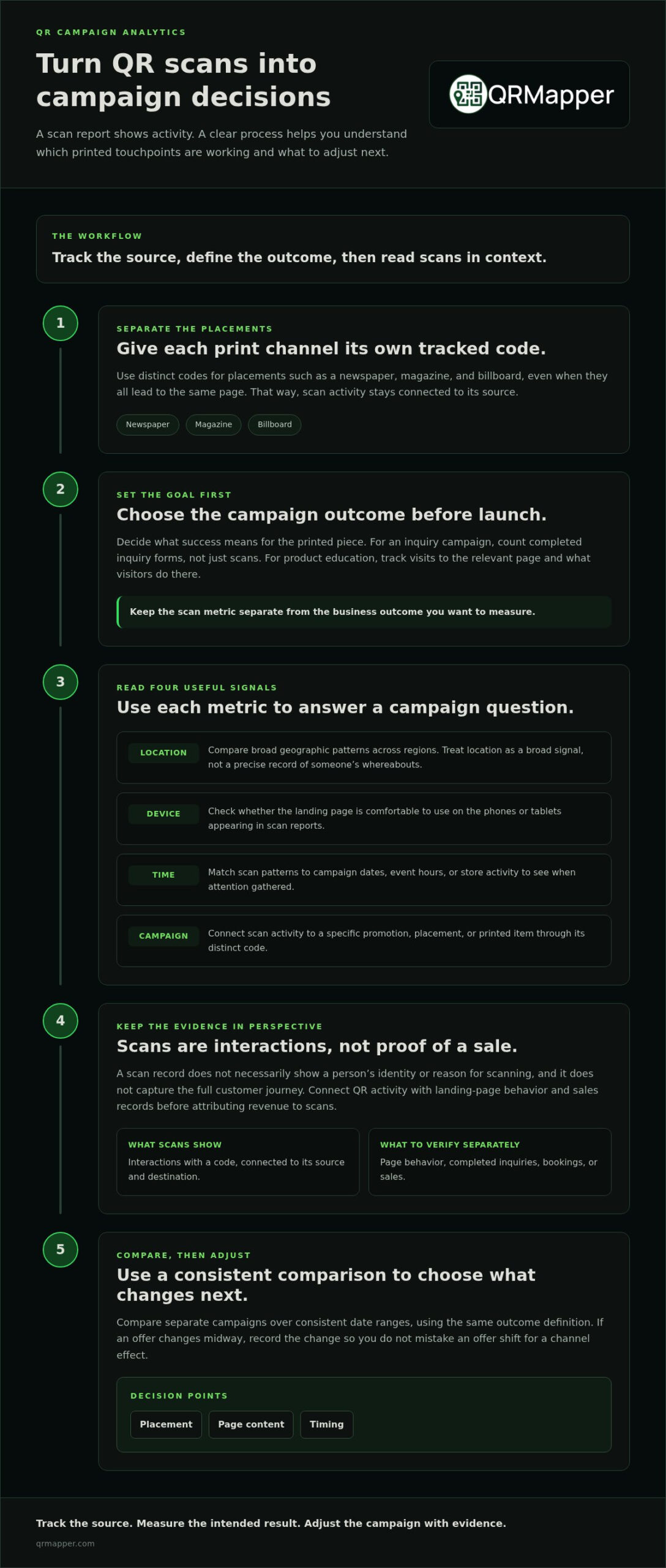
Scan totals show activity. Useful marketing analytics help you decide what to do next. Compare location, device, timing, and campaign source to understand which printed touchpoints reach your target audience.
A scan report records interactions with the code, not the full customer journey. A visitor might scan product packaging, browse a product page, and purchase later. Connect QR activity with landing-page behavior and sales records before attributing revenue to scans.
Use each metric to answer a specific campaign question
Location helps you compare broad geographic patterns, while device data shows the kinds of phones or tablets people use. Timing reveals when scans happen. Campaign labels connect those observations to a specific promotion, placement, or printed item.
- Location: Compare scan activity across regions served by a real estate campaign or event promotion. Treat location as a broad signal, not a precise record of someone’s whereabouts.
- Device: Review whether mobile visitors can use the landing page comfortably on the devices appearing in scan reports. A crowded page may create friction even when the code scans successfully.
- Time: Match scan patterns to campaign dates, event hours, or store activity. A spike after an event banner appears can show when attention gathered.
- Campaign: Assign distinct tracking codes to separate print placements, even when they lead to one destination. This preserves the source of each scan in your comparison.
Measure attribution without mistaking scans for sales
QR analytics can support attribution by connecting a scan to its source code and destination. By itself, it cannot establish that a scan caused a sale, booking, or qualified lead. For example, a hotel can compare scans from a lobby sign with visits to its booking page, then assess completed bookings separately.
Define the outcome before launch. If a campaign aims to collect inquiries, count completed inquiry forms, not just code scans. If packaging supports product education, track visits to the relevant page and what visitors do there. Keep scan metrics distinct from business outcomes.
Use a consistent comparison method: separate campaigns, consistent date ranges, and the same outcome definition. If you change the offer midway, record that change. Otherwise, a shift in scans may reflect the new offer rather than the print channel. This discipline makes analytics more useful when planning the next campaign.
For a practical review, compare scan activity with the campaign’s intended result, then decide whether to adjust placement, page content, or timing. A managed analytics view can help keep those records organized as printed campaigns run; explore QR campaign analytics as one option.
Can I change the link after printing my QR code?
Yes, if the printed code uses an editable redirect. Change the destination in its management dashboard, then test the updated link before directing customers to a yard sign, event banner, or brochure.
Useful management software should let you edit destinations, review scan activity, organize codes, and control who can make changes. For a business running several campaigns, a clear dashboard and permission settings help keep updates accountable.
To create, edit, and track a campaign, set its destination, assign a code to each placement, test the scan, then review activity after distribution. Record the campaign’s purpose and intended audience alongside its code.
Risks include someone covering a legitimate printed code with a malicious sticker, unauthorized destination changes, or a compromised destination page. Inspect physical codes, restrict dashboard access, and test destinations before and after updates.
Build a reliable update process before printing
A dynamic code separates the printed pattern from the page it opens. A manager can revise the destination without reprinting, but the team still needs a deliberate review process. For a hotel lobby sign, confirm the replacement page, check its content, and scan the existing code before considering the change complete.
- Choose a destination that serves the campaign’s purpose, such as an event schedule or product page.
- Create the dynamic code and scan it with a mobile device before printing.
- Review the landing page on the same device, then confirm the code points to the intended content.
- After printing, update the destination only when the replacement is ready, then scan the code again.
Testing matters because a code can scan correctly even when its destination is outdated, confusing, or unavailable. A trade show handout should lead to the current resource, not a draft page or expired event details.
Plan multilingual experiences and manage codes at scale
A QR code does not translate content or generate responses by itself. For a multilingual experience, the code opens the destination; language selection and response behavior depend on the website or service it opens. Confirm that each language path leads to the right content before printing.
As campaigns grow, name codes by purpose and placement, such as “Spring event banner” or “Product packaging.” Separate codes can lead to the same page while showing which channel produced each scan. Clear labels make tracking easier across teams and campaign periods.
Dynamic QR code management is most useful when someone owns destination changes, another teammate can review them, and scan records inform a clear next action. A managed campaign workspace can support that discipline; explore QR campaign management as one option.
Redirect URLs and server-side destination updates
A redirect lets a printed QR code lead to a destination that can change later. The code points to a redirect address; a server routes each scan to the active page, such as a retail promotion or product guide.
That separation is key. The printed pattern stays unchanged, while an authorized user updates the destination in the management system. A QR code generator creates the pattern; the redirect service determines where its link sends visitors.
How the redirect path works
When a customer scans a code on a retail display, the phone reads its encoded address and requests it online. The redirect service checks the current destination, then sends the browser there. This requires an internet connection and an active redirect path.
For example, a store can point one printed sign to a seasonal offer, then change the destination to current product information. The code itself stays the same. Have the updated page ready before editing the redirect, so a scan does not lead to an unfinished page.
To measure a specific placement, use a separate dynamic code for each channel, even when the codes lead to the same page. You can then review a magazine insert and a store display independently, rather than blending their scan activity into one record.
Change the destination with a controlled workflow
Use a simple review sequence for each destination update:
- Confirm the replacement page is published and works on a mobile browser.
- Open the code’s redirect settings and enter the new destination address.
- Save the change, then scan the printed code with a phone.
- Check that the scan reaches the intended page and that campaign tracking remains clear.
A destination can change without reprinting only when the printed code leads through an editable redirect. A static code encodes its destination directly, so changing that destination usually requires a new code and new print materials.
Domain ownership and service continuity affect long-term availability. If a redirect relies on a managed service, it depends on that service remaining active. If you use a custom domain, its registration and configuration must also stay in place. When a subscription ends, continued redirects depend on the service’s account terms and the status of the redirect domain.
Before printing a retail package or event banner, record who owns the domain, who can edit redirects, and what happens if the account or service ends. These details help prevent avoidable dead links. A printed code is useful only while its redirect route and destination remain reachable.
Changing a QR code after printing
A printed code can serve a new purpose when its destination uses an editable redirect. The physical square stays in place; a manager updates the destination, tests the scan, and confirms that the new page works on a phone. This can avoid a reprint when an event schedule changes or a product page moves.
Change the destination without losing control
Start with the exact item already in circulation. A venue, for example, may have an event banner pointing to a schedule that has changed. Publish the replacement schedule before updating the redirect, then scan the banner’s code and verify that the correct page appears.
Use a short review process for each change:
- Identify the physical placement, such as a lobby sign, package, or trade show handout.
- Confirm the new page is live and suited to mobile viewing.
- Update the destination in the platform, keeping the original code assigned to its intended campaign.
- Scan the printed code and review the page, links, and campaign tracking.
This sequence prevents a common oversight: changing the destination before the visitor experience is ready. If a restaurant changes a table tent from a seasonal menu to an ordering page, check that the page opens directly and reflects the current offer.
Keep printed placements understandable over time
A code generator creates the pattern, but the platform determines what happens after a scan. Name each code for its placement and purpose, such as “garage entry sign” or “spring catalog.” Clear labels help the team distinguish active codes from old campaigns when several printed materials remain in use.
For campaigns with distinct phases, one code can serve different destinations at scheduled times. An event banner might lead to registration before the event, then to the schedule during it. Assign an owner to confirm each transition and scan the code at the start of each phase.
Separate codes can preserve channel-level records while leading to the same page. A brochure and a retail display can each use their own code, allowing the team to compare scans without confusing the placements. Document any change in a code’s purpose.
Tip: Before your next print run, record the code’s placement, destination owner, and update process. For an existing campaign, scan a physical copy and confirm its current destination, page content, and tracking label.
Changing a destination works only while its redirect remains active. Treat each printed code as an ongoing responsibility: control access, check destinations after edits, and retire codes when their campaigns no longer have a useful page.
QRMapper: QR Code Management
QRMapper helps your team connect printed campaigns with accountable digital follow-through. Its QR Code Management and analytics offerings can help managers review campaign activity alongside their broader marketing work.
For an event team, a code can connect printed signs with registration, schedules or replay pages. QRMapper’s Business plan includes scheduled redirects, so the destination can change with the event’s timeline.
If your team is mapping out its next campaign, visit QRMapper to explore its QR management.
Make every printed code part of a deliberate plan
Your next step is to decide who owns each code after it enters circulation. Assign responsibility for destination changes, access, and review. That small act of governance helps keep a campaign coherent when staff, pages, or priorities shift.
Treat dynamic QR code management as part of your broader marketing operations, not a task that ends when printing begins. QRMapper provides editable destinations and scan analytics, helping your team manage printed touchpoints as active parts of a campaign.
Start with one live placement. Identify its purpose, decide who will manage it, and make the next update deliberately. As your approach develops, apply the same discipline across campaigns and teams.
Contact QRMapper about QR management to discuss how managed codes can fit your marketing work. A clear process today gives your next printed campaign a stronger path forward.
Frequently Asked Questions
Are dynamic QR codes worth it for business?
Dynamic codes are worth considering when printed materials need to support changing information or ongoing measurement. A seasonal catalog that remains in circulation may benefit from a destination the team can keep current. A one-time flyer with a stable page may not need an editable redirect.
Do dynamic QR codes work without internet?
No. A phone needs an internet connection to follow a dynamic code’s redirect and open its destination. If visitors may be offline, include essential details directly on the printed material, such as an event’s start time or a parking instruction.
Do QR codes expire, and how long do dynamic codes stay active?
A dynamic code’s printed pattern does not have an expiration date, but its redirect depends on the service remaining active. Keep the account and destination maintained for as long as printed copies are in use, especially for packaging or signs that may stay in circulation.
How do I track QR code scans?
Review the code’s analytics dashboard for scan activity and available details such as device type, browser, and whether visitors are new or returning. For campaigns with several placements, label each code clearly so you can interpret its report without confusing it with another piece.
How can teams manage dynamic QR codes across locations and campaigns?
Use consistent names that identify the campaign, placement, and responsible team, then define who can edit destinations and review analytics. A retailer can use the same naming structure for store displays and packaging, helping staff find the right code and maintain clear ownership as campaigns change.
What privacy laws and consent requirements apply to QR code tracking in the United States?
Consider what scan data you collect, whether it identifies or profiles people, and which jurisdictions apply. Explain what you collect and why, and obtain consent where applicable under the laws governing your campaign.
Which dynamic QR code management platforms are best for businesses?
Choose a managed platform with a clear dashboard for editing destinations, reviewing scan activity, organizing codes, and controlling who can make changes. For teams, permission settings and an accountable update process matter.