
An active webpage doesn’t guarantee that a printed QR code will reach it. What happens when a QR code link breaks depends on what the code contains: a direct link may point to a page that has moved, while a managed code may fail if its redirect or domain is unavailable.
The square on a sign, menu, or event banner may still scan correctly even when its path leads nowhere. Distinguishing a scanning problem from a destination problem matters because each has a different cause and needs a different fix.
This article explains how redirects, provider shutdowns, and destination changes affect printed codes. It also shows how managed QR infrastructure can keep a campaign destination current without replacing the printed code, and how to pinpoint where a link failed so you can choose a practical next step.
Key Takeaways
- Separate a code that cannot be scanned from a destination or redirect that no longer works; each points to a different cause.
- Check whether the code leads to the intended page, not merely whether the original web address is active.
- Understand how domain changes, redirect settings, and provider shutdowns can affect codes already printed and in circulation.
- Use editable routing to update a campaign destination while keeping the printed code in place.
- Review scan analytics and fallback options to give printed materials a clearer path forward when a page is unavailable.
QR code links that lead to generic or incorrect destinations
A QR code can scan perfectly and still send someone to the wrong place. Understanding what happens when a QR code link breaks starts with separating the readable square from its destination: the pattern may work while the page is outdated, generic, or controlled by someone else. A restaurant table tent might open the restaurant’s homepage instead of its current menu. A property yard sign might lead to a general listings page rather than the advertised home.
A generic destination creates friction because visitors have to search again. A hotel guest scanning a lobby sign expects check-in information, not a corporate homepage. The wrong destination can also undermine a campaign: a trade show handout meant to share a product guide might open an old promotion. The code can remain readable even when the destination no longer matches what the print promises.
Link checks and redirects help prevent ordinary destination drift. Before printing, scan each code with a phone and confirm it opens the intended page. Recheck the destination when a website is reorganized, a campaign ends, or a product page changes. If the original address moves, a server-side redirect or editable QR destination can send visitors to the replacement. Test the redirect too: a chain of outdated redirects can still end at an error page.
Before opening a code, review the link displayed by your phone’s camera. Check that the domain matches the business or organization named on the sign, and pause if the link or requested action seems unrelated. Treat a payment prompt on a parking sign with particular care. Fake QR-code stickers on parking meters have been used to direct people to fraudulent payment sites that steal credit card information. A familiar-looking sign does not prove its code is genuine.
A recognizable link gives visitors another way to judge whether a destination fits the printed material. On a hotel check-in sign, for example, a branded domain clearly related to the hotel is easier to assess than an unexplained shortened address. Recognition is a signal, not proof of safety: a malicious QR code can lead to a page designed to steal personal information or install malware.
For a printed campaign, keep the destination aligned with its context. A restaurant menu code should lead to the current menu; a venue banner should open useful event details. If a scan requests confidential information, stop and consider whether the request makes sense for the sign and organization. A good link is not merely one that opens. It is current, relevant, and recognizable.
Dynamic routing and updating printed QR campaigns
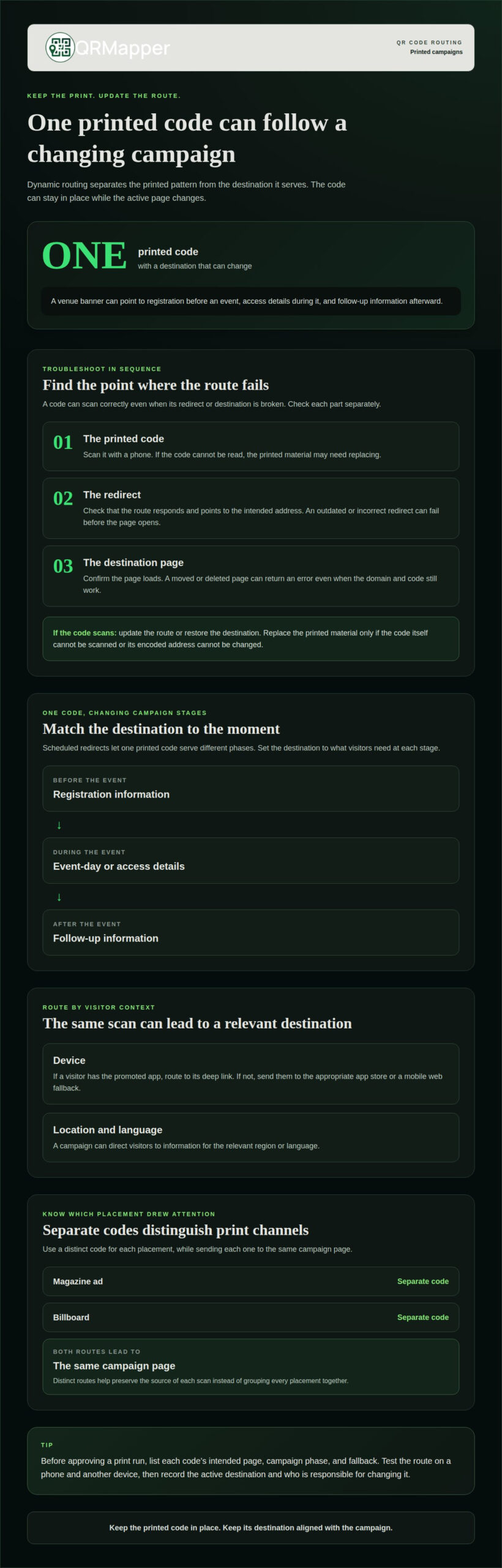
If a printed QR code stops working, first determine whether the code scans, its redirect responds, and the destination page loads. If the code is readable but its route or page has changed, update the route or restore the destination. Replace the printed material only if the code itself cannot be scanned or its encoded address cannot be changed.
Dynamic routing separates the printed pattern from the destination it serves. A campaign team can leave an event banner in place while changing its route from registration to event-day details, then to a follow-up page. Visitors scan the same code, but the active destination reflects the current campaign phase. An update doesn’t have to mean printing a new version.
Routing can also account for the device receiving the scan. A campaign promoting a mobile app, for example, can open a deep link for visitors who have the app installed. If it isn’t installed, the route can lead to the appropriate app store or a mobile web fallback. Two people scanning the same code may land in different places because their devices and settings differ.
Location and language can also shape a route. A national event banner could direct visitors to registration information in the relevant language or region. For a campaign with several stages, scheduled redirects let one printed code serve each phase. Decide what visitors should see at each stage before printing the banner, handout, or sign.
Separate codes can distinguish channels while leading to the same destination. An agency might place one code in a magazine ad and another on a billboard, with both opening the same campaign page. Distinct routes help preserve the source of each scan, giving the team a clearer view of which printed placement drew attention instead of grouping every scan into one result.
Tip: Before approving a print run, list each code’s intended page, campaign phase, and fallback. Test the route on a phone and another device. Record the active destination and who is responsible for changing it. This gives the next campaign manager a clear starting point when schedules, offers, or event details shift.
For campaigns with multiple phases, define the changeover points before launch. A venue might direct visitors to registration before an event, access details during it, and follow-up information afterward. Clear timing and ownership help keep each stage aligned with what the printed material promises.
Broken QR-code redirects and 404 errors
A QR code can scan successfully and still lead to a 404 error. Links stop working when a destination page is deleted or moved, a redirect points to the wrong address, or the domain or redirect service becomes unavailable. The square may remain intact; the route after scanning is what failed.
A 404 means the requested page can’t be found at that address. For example, a product manual code may still contain a link to “/manual,” while a website restructure moved the guide to a new page. The domain can remain active, and its homepage can load, even though that specific path returns an error.
Redirects create another point where a route can break. A redirect might send visitors to an outdated page, contain a typing error, or point to an address that no longer exists. A chain can also fail partway through: the QR code reaches one redirect, which forwards to another, but the final page has been removed. Every handoff needs a valid next address.
To locate the failure, trace the scan in order:
- Scan the printed code. If the phone camera cannot read it, the problem starts with the code’s print quality, size, or surface, not its destination.
- Read the address that opens. Compare its domain and page path with the intended destination, especially after a website redesign.
- Open the final page on mobile. A working homepage does not prove that a campaign page or manual is available.
- Review each redirect. Confirm that every step leads to a current page, not another missing address.
This sequence helps distinguish a scanning failure from a link failure. If a phone reads the code but displays an error page, replacing the printed square may not solve the problem. The address or redirect needs attention. If the code opens an unrelated page, the route may work but point to the wrong destination.
When a page moves, a business can set up a 301 redirect on its server or update the destination of a dynamic QR code. For example, a brochure already in circulation can continue pointing visitors toward a replacement manual page, provided its encoded route remains manageable. A direct code that contains the old page address depends on that address continuing to work.
For a printed campaign, record the code’s destination, any redirect addresses, and the final page. When an error appears, this record gives the website team a clear path to investigate. Restoring a page, correcting a redirect, or updating a managed destination addresses different failures. The visible error alone won’t reveal which one occurred.
Dynamic redirects for updating destinations
A redirect is an address between a QR scan and the final page. A static code can encode the destination URL itself, while a dynamic code can encode a redirect address that routes onward. The difference determines who controls the route and where to make changes when a destination moves.
Each scan follows a sequence: the phone reads the encoded address, requests it, then receives a destination or instructions to continue elsewhere. A dynamic QR platform can complete this routing quickly, but every address in the sequence still needs to resolve correctly. A working first redirect can’t compensate for a missing final page.
For a website restructure, a 301 redirect on the server can forward an old page address to its replacement. This is useful when printed material contains the old URL directly. The web team maps the former page path to the current one, then tests the old address itself, not only the new destination.
Redirect errors often come from the route’s configuration rather than the destination’s content. A mistyped page path may send visitors to a 404. A redirect loop can send a browser back and forth between addresses without reaching a page. A chain with several outdated handoffs can also fail before the intended content loads.
Keep a simple route record that names the encoded address, each redirect, and the final destination. Add the owner of each address and the page’s purpose. For example, a visitor guide might pass through a campaign address before reaching a venue’s current arrival information. This record helps the web team identify which handoff needs repair.
After changing a route, test the complete path from the printed code. Confirm the address shown by the phone, follow it through every redirect, and check that the final page loads on mobile. If the campaign uses different destinations by phase, test both the currently scheduled phase and the next route visitors will use.
Keep control of the domain in the encoded redirect address. If it belongs to an agency or former provider, a later account or service change can complicate maintenance. Assign a responsible owner and keep route details with the campaign records. These operational steps make it easier to diagnose a broken handoff without mistaking it for a broken destination.
Provider shutdown and code transfer limitations
A printed code can outlive the service routing its scans. If a dynamic QR code relies on a provider’s redirect domain, that route may stop working when the provider shuts down or disables the account. The camera can still read the pattern, but visitors may reach an error instead of the intended page.
Transfer depends on what the code encodes. A static code contains its destination directly, so it can keep working as long as that address remains active. A dynamic code usually contains a redirect address; changing providers won’t automatically change the address already printed on menus, brochures, or product packaging.
That distinction matters during a migration. If a hotel has distributed key cards pointing to a provider-controlled redirect, creating replacement codes won’t update those cards. The old redirect must remain available, or the business needs control of a domain that can keep routing those scans. Without control of the encoded address, a new provider can’t simply take over the old one.
Before committing to a redirect setup, identify who controls each part of the route:
- The printed address: Find the domain or redirect address encoded in the QR pattern.
- The domain account: Confirm who can manage its registration and DNS settings.
- The destination record: Keep a copy of the current landing page and routing details.
- The account access: Record the administrator responsible for billing, permissions, and service changes.
A manufacturer using QR codes on packaging, for example, should document the redirect domain before changing platforms. If the manufacturer owns the domain, its team may be able to point it to a new routing service. If the provider owns it, transferring the printed route may not be possible. The encoded address determines the boundary.
Plan for continuity while codes are still being designed, not after a provider announces a shutdown. Assign an internal owner, store account credentials securely, and keep the intended destination in a shared record. A marketing lead replacing an agency should also document which printed campaigns use each redirect, so active brochures and signs aren’t overlooked.
During a migration, test a physical sample with a phone camera. Confirm that the printed pattern opens the expected destination, then test the route again after the provider or domain changes. A successful test of a newly generated code doesn’t prove that older packaging or signage still works. Test the old pattern through its existing address.
QRMapper: QR Code Management
QRMapper helps teams manage printed QR codes after they’re in circulation. Its scan analytics show scan timing, unique versus repeat visitors, device type, browser, and country. The data is anonymized, so personal visitor information isn’t stored.
With QR Code Management, your team can change a destination without reprinting the code. That matters when a property listing moves, an event schedule changes, or a campaign page is replaced. You can also use scheduled redirects to send one printed code to different destinations as a campaign progresses.
QRMapper provides managed QR infrastructure, not just a code creation tool. If you’re responsible for keeping printed materials useful and understanding scan activity, explore QRMapper’s QR code management tools and create a permanent QR home.
Give every printed code a clear next step
Plan your next QR campaign for more than the day it goes to print. Decide who will own its destination, how you’ll review scan activity, and what visitors should find when they arrive. That preparation gives your team a practical way to respond as pages, campaigns, and responsibilities change.
Knowing what happens when a QR code link breaks helps you plan before an error reaches a customer. QRMapper combines dynamic QR code management with analytics, so you can manage printed campaigns with both their destinations and performance in view.
If you’re planning a new campaign or reviewing codes already in circulation, contact QRMapper about QR code links. A clear plan can help your next printed piece keep its purpose as the campaign moves forward.
Frequently Asked Questions
Can a QR Code stop working even if the link is still active?
Yes. A camera may be unable to read a damaged, distorted, or poorly printed pattern, even when the destination page still loads. A code may also rely on an unavailable redirect service before reaching that page. To narrow down the cause, scan the code with a phone camera and note whether a web address appears. This helps distinguish a reading issue from a problem along the route.
What happens when a QR code points to a broken or expired URL?
The scan may open an error page, a missing page, or a domain that no longer responds. That doesn’t mean the printed pattern itself has expired: QR codes don’t expire by default, but a destination address or routing service can become unavailable. For example, a code on an older product label may still scan even though its former support page has been removed.
How to tell whether a QR code link is broken or the QR code itself is damaged?
Check the phone’s camera banner after scanning. If a URL appears, the pattern was read and the issue is likely with the link or its route. If nothing appears, inspect the printed pattern for smudges, folds, glare, or low contrast, then try another copy. If a digital image scans clearly but the physical sign doesn’t, print or surface conditions may be the cause.
How to fix a QR code that leads to a 404 or unavailable page?
Restore the missing page or redirect its old address to a relevant replacement. If the printed code uses a managed destination, update that destination instead. QRMapper’s Safe Home provides a fallback address for a code without a working destination. It’s available on every plan, including Free, and can give scanners an alternative destination rather than an error page.
Can a QR code link be changed after the code is printed?
Yes, if the printed pattern points to an editable destination. With QRMapper, the pattern stays the same while the destination URL can be changed after printing. The change applies to printed copies. A product insert, for example, can keep directing customers to current support information after a company reorganizes its help pages. A code that directly encodes an old address needs that address maintained or redirected.
How to redirect an old QR code URL to a new website page?
If you control the old web address, configure a 301 redirect to the replacement page. For a managed QR code, change the destination associated with its printed short link. For example, send an old brochure link to the current booking page, not a general homepage. Test the old printed code after the change, since creating a redirect for a new address won’t repair a different address already encoded in print.
How can users safely handle a QR code that opens a broken or suspicious link?
Don’t enter passwords, payment details, or personal information on a page that doesn’t match the sign’s purpose. Review the domain shown by the phone before continuing, and close the page if it looks unrelated or asks for an unexpected action. A QR code can lead to a malicious site, so a familiar poster alone doesn’t prove the destination is trustworthy. Use the organization’s known contact channel to find its intended page.